
When you want to request a PayNow payment from a customer, you can generate a QR code for them to scan.
This works fine 95% of the time, like when you are selling baked items or crafts at a weekend market. Create a PayNow QR code, scan, pay, done.
But what if the customer says, “can I have an invoice too”?
When do Customers Actually Need An Invoice?
The most common reasons for an invoice include:
She is claiming the money back. A company expense, a reimbursement form, an insurance or warranty claim. Whoever approves it wants a document showing your business name, the date, what was bought and what it cost.
A company is paying, not a person. The person who ordered is not the person who pays. Finance needs something to work from, and they will pay on their own schedule rather than on the spot.
The order value is large. This requires a written record of what was agreed, and at what price.
The customer is GST-registered. They keep records of what they buy.
What Needs to go on the Invoice
Your business details. Business name, and your PayNow recipient: a UEN, a mobile number, or a wallet address. Address, email and phone are optional, but worth filling in.
One thing to note: If you are collecting PayNow to your mobile number, then the name that your customer sees in their banking app when they scan your QR may not match the name you typed on the invoice. A UEN avoids the problem, because it shows your registered business name instead. If you do not have one yet, here is what a UEN is and how to get one. Which recipient format to use is covered in UEN, mobile and VPA compared.
Who you are billing. Name, and their address or email if you have it.
The line items. Description, quantity, unit price. The total is what goes into the QR code, so this is the part to get right before you generate anything.
The invoice number and date. When you generate the invoice, the invoice number is written into the PayNow QR code as the payment reference. The customer scans, their banking app fills the reference in, and the payment lands in your account carrying that number.
This is great for matching a payment to an order. Poor reconciliation is a common mistake that sellers miss out, so this solves it.
Generate Invoices with PayNow QR Codes
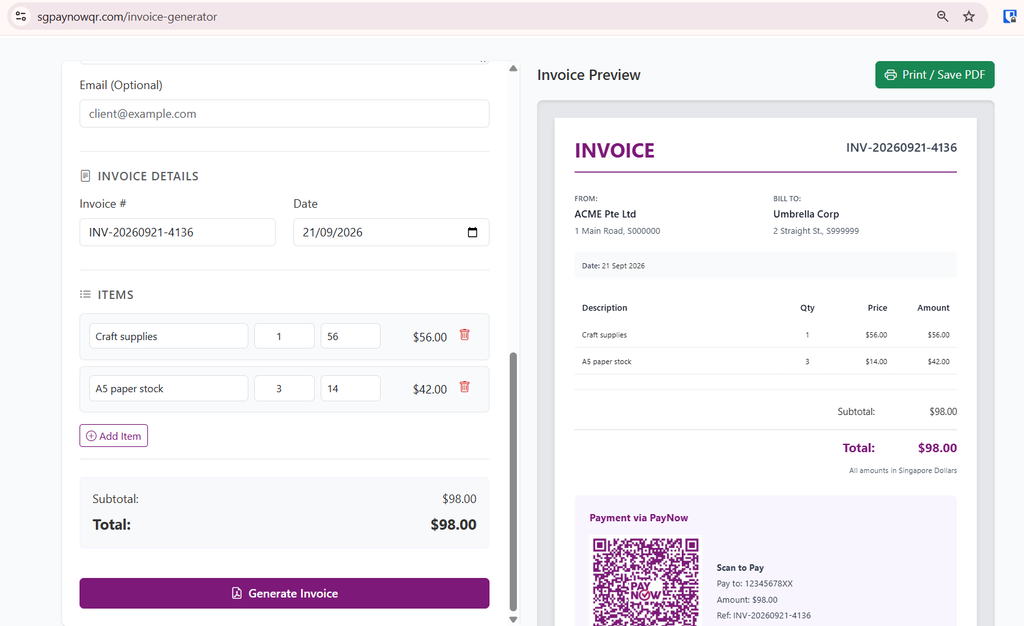
We provide two free ways to generate invoices with PayNow QR codes in them:
The web invoice generator runs in your browser, and does not need any sign up. You can edit the invoice number, pick the date, and use a wallet address as your recipient. The QR code never expires.
The Android mobile app runs in your phone. Your business details are saved in the settings, so you don’t have to retype them every time. It creates invoices using a number sequence. And all invoices are kept in your phone history for you to export as PDF that you can send to your customers via WhatsApp.
When you generate an invoice that includes a PayNow QR, you enjoy several advantages:
The amount is filled in and locked. The total from your line items goes into the code, and the code is flagged as non-editable. So the customer cannot round it down, and or accidentally change the amount from $480 to $48. All they need to do is scan, they see the amount, and confirm.
The reference is filled in. The customer does not have to type your invoice number into a field. It’s already there.
It does not expire. The QR code on a generated invoice has no expiry date. An invoice can often sit in someone’s inbox for a week before finance gets to it, so a QR code that expires in 24 hours would be useless.
What About GST?
If you are a GST-registered business in Singapore (i.e. more than SGD1 million in taxable turnover per year), then you can switch “GST” to ON and it will auto-add GST amount to each invoice.
Try it Free
Install the Android app if you need to generate PayNow QR codes and invoices often, or use the website for once-off. Try it!