So you’ve decided to set up your own online store. Maybe you’re tired of watching Shopee take a bigger cut every year. Maybe you want to own your customer relationships instead of renting them from a marketplace.
Whatever the reason, you’ve landed on the same question every new Singapore seller eventually asks:
Shopify or WooCommerce?
Both are solid platforms. Both power millions of stores worldwide. But they work very differently, and when you factor in Singapore-specific costs (especially around PayNow) the numbers start to look quite different too.
This guide walks you through both options. We don’t say that “one platform rules them all”. But we will get to real numbers and practical trade-offs so you can pick the one that fits your situation.
First, what are we actually comparing?
If you’re not too familiar with either platform, here’s the short version.
Shopify is a hosted, all-in-one e-commerce service. You pay a monthly subscription, and Shopify handles the hosting, security, updates, and technical infrastructure. You build your store using their tools, and everything lives on their servers. Think of it like renting a unit in a shopping mall. The mall handles the common areas and maintenance, but you’re bound by their rules and you pay rent every month.
WooCommerce is a free, open-source plugin that turns a WordPress website into an online store. You need to arrange your own hosting (a separate monthly cost), and you handle updates and maintenance yourself or through your hosting provider. Think of it more like owning a shophouse. There is more work upfront, but you control everything and there’s no landlord to answer to.
Both can produce a great-looking store. Both can handle inventory, orders, shipping, and payments. The differences are in cost and control.
Cost Comparison
This is the part that matters most when you’re starting out. Let’s model both platforms for a small Singapore seller doing about $4,000 per month in revenue.
Shopify costs
Shopify’s most popular plan for new sellers is the Basic plan at SGD 39 per month.
On top of the subscription, you pay transaction fees. If you use Shopify Payments (their built-in payment processor), credit card rates are 3.2% + $0.50 SGD per transaction on the Basic plan. If you use any third-party payment gateway instead of Shopify Payments, Shopify charges an additional 2% fee on top of whatever that gateway charges.
Here’s where it gets tricky for Singapore sellers: Shopify Payments does not support PayNow. That’s a problem, because PayNow is the payment method of choice for 68% of Singapore’s Gen-Z consumers and is widely used across all age groups.
To accept PayNow on Shopify, you need a third-party gateway like HitPay or Stripe. HitPay charges around 0.65% to 0.9% per PayNow transaction. Stripe charges 1.3%. And on top of that, Shopify charges you the additional 2% third-party gateway fee on the Basic plan.
So for a PayNow transaction through HitPay on Shopify Basic, you’re looking at roughly 2.65% to 2.9% in combined fees — for a payment method that is supposed to be nearly free.
Let’s add it all up for a seller doing $4,000/month, assuming 60% of transactions are PayNow (through HitPay) and 40% are credit cards (through Shopify Payments):
| Cost Item | Monthly |
|---|---|
| Shopify Basic subscription | $39.00 |
| Credit card fees on $1,600 (3.2% + $0.50 per txn, ~20 orders) | ~$61.20 |
| HitPay PayNow fees on $2,400 (~0.8% avg) | ~$19.20 |
| Shopify 2% third-party fee on $2,400 PayNow | $48.00 |
| Total monthly cost | ~$167.40 |
| Annual cost | ~$2,008.80 |
That’s about 4.2% of your revenue going to platform and payment fees each month.
WooCommerce costs
With WooCommerce, the core software is free. Your main costs are hosting and payment processing.
For hosting, a Singapore seller can get started on a plan from providers like SiteGround (from around $2–$4/month on introductory pricing, renewing at $18/month), Hostinger (from around $3–$4/month), or a local host like Quape or CLDY (from about $10–$12/month). Let’s use a realistic average of $15/month including a domain name — that accounts for the fact that introductory pricing doesn’t last forever.
For payments, here’s where WooCommerce shines for Singapore sellers. You can install the SGPayNowQR plugin for WooCommerce and accept PayNow at zero commission. The money goes straight from your customer’s bank to yours. No middleman, no percentage cut.
For credit cards, you install Stripe alongside it. Stripe charges 3.4% + $0.50 SGD per credit card transaction in Singapore. But here’s the key difference: there’s no additional platform fee on top. WooCommerce doesn’t penalise you for choosing your own payment gateway.
Same seller, same $4,000/month, same 60/40 PayNow to credit card split:
| Cost Item | Monthly |
|---|---|
| Hosting (WordPress + WooCommerce) | $15.00 |
| Credit card fees on $1,600 (Stripe, 3.4% + $0.50 per txn, ~20 orders) | ~$64.40 |
| PayNow fees on $2,400 (SGPayNowQR) | $0.00 |
| Total monthly cost | ~$79.40 |
| Annual cost | ~$952.80 |
That’s about 2.0% of your revenue — roughly half of what you’d pay on Shopify.
The cost difference adds up
Over a year, the WooCommerce setup saves this seller about $1,056. And the more revenue you do, the wider the gap gets, because Shopify’s percentage-based fees scale up with your sales while WooCommerce’s hosting cost stays flat.
At $8,000/month in revenue (still with a 60/40 PayNow split), the annual savings on WooCommerce grow to over $2,200.
For a small seller, that’s real money. That could be your next product run, your first paid ad campaign, or just a healthier margin on everything you sell.
Ease of use
Shopify is genuinely easier to set up. There’s no way around this.
With Shopify, you can go from zero to a working store in an afternoon. You sign up, pick a theme, add your products, connect a payment method, and you’re live. The admin dashboard is clean and intuitive. If you can use Canva, you can use Shopify.
WooCommerce has a steeper learning curve. You need to pick a hosting provider, install WordPress, install the WooCommerce plugin, choose and configure a theme, and set up your payment plugins separately. If you’ve never touched WordPress before, expect to spend a weekend figuring things out — or longer if you want to get the design right.
That said, the gap is smaller than it used to be. Many hosting providers now offer one-click WordPress and WooCommerce installation. SiteGround, for example, will have WooCommerce pre-installed for you. And once the initial setup is done, the day-to-day of managing products and fulfilling orders in WooCommerce is not that different from Shopify. You’re clicking around a dashboard, updating inventory, and processing orders either way.
The real question is: are you willing to invest a bit more time upfront to save significantly on ongoing costs? If the answer is yes, WooCommerce is very doable even if you’re not technical.
Flexibility and control
This is WooCommerce’s strongest suit.
Because WooCommerce is open-source and runs on your own hosting, you have full control over everything: your store’s code, your design, your data, and critically, your checkout experience. There are over 59,000 free WordPress plugins and thousands of WooCommerce extensions. If you want a feature, there’s almost certainly a plugin for it.
Shopify has a solid app ecosystem too (over 8,000 apps in their app store). But you’re building on someone else’s platform. Shopify controls what you can and can’t do with your checkout. They can change their policies, their pricing, or their algorithm at any time — and you don’t get a say.
For Singapore sellers, the most practical implication of this difference is around payments. On WooCommerce, you can install a dedicated PayNow plugin like SGPayNowQR and keep 100% of those transactions. You can also run it alongside Stripe so your customers can choose between PayNow, credit cards, GrabPay, and more — all without a platform surcharge.
On Shopify, you’re always going through a payment gateway that takes a cut. And if that gateway isn’t Shopify Payments, you’re paying Shopify’s additional transaction fee on top.
The PayNow factor
This deserves its own section because it’s the single biggest differentiator for Singapore sellers.
PayNow is used by millions of Singaporeans. It’s fast, familiar, and trusted. For an online store selling locally, it should be your primary payment method — not an afterthought.
Here’s how PayNow works on each platform:
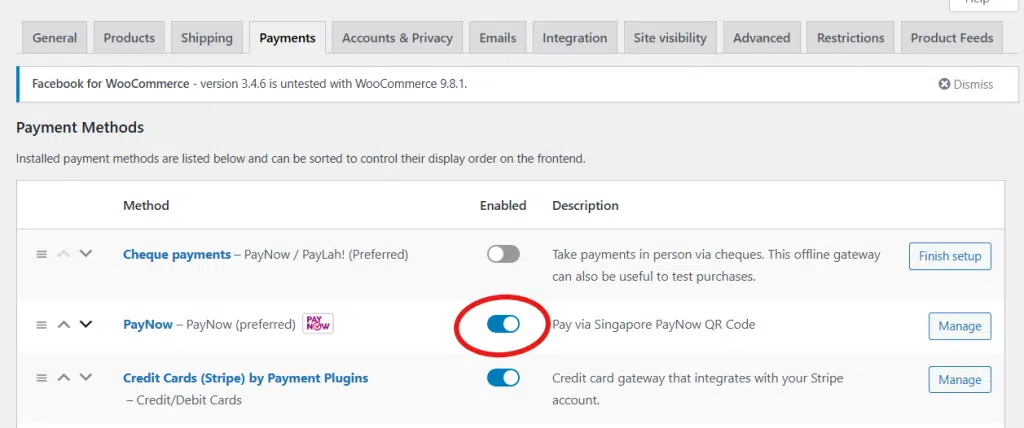
On WooCommerce: Install the SGPayNowQR plugin. At checkout, customers see a PayNow option. When they select it, a dynamic QR code is generated with the exact amount and order reference. They scan it with their banking app, confirm the payment, and the money goes straight into your bank account. No commission. No middleman. No settlement delay.
The trade-off is that payment confirmation is manual — you check your bank notifications and update the order status in WooCommerce. It’s a small extra step, but for most small sellers processing a manageable number of orders, it’s not a burden. And the savings are immediate.
On Shopify: You need a third-party app like HitPay or CartDNA to accept PayNow. These gateways charge their own commission (typically 0.65% to 1.5% per transaction). On top of that, Shopify charges an additional 0.6% to 2% because you’re not using Shopify Payments. There is currently no way to accept PayNow on Shopify at zero cost.
For a deeper dive into PayNow gateway fees, check out our full comparison of payment plugins.
What about SEO and marketing?
Both platforms give you the basics for search engine optimisation — customisable page titles, meta descriptions, clean URLs, and blogging capability.
Shopify’s SEO is good enough for most sellers, though it has some structural limitations (like not being able to fully customise your URL structure). WooCommerce, running on WordPress, has a slight edge here because WordPress was originally built for content and blogging. Plugins like Yoast SEO or Rank Math give you granular control over your on-page optimisation.
If content marketing and SEO are part of your long-term strategy — writing blog posts, building landing pages, growing organic traffic — WordPress/WooCommerce gives you more room to work with.
For paid advertising and social media marketing, both platforms integrate well with Facebook, Instagram, Google Ads, and TikTok. No major difference there.
So, which one should you pick?
Rather than giving you a one-size-fits-all answer, here’s how to think about it.
Shopify makes more sense if:
- You want the fastest, easiest possible setup and are willing to pay more for that convenience
- You’re not very technical and don’t want to deal with hosting, updates, or plugin configurations
- You plan to sell internationally and need a platform that handles multi-currency and global shipping out of the box
- PayNow isn’t a big part of your payment mix (e.g., you’re selling mostly to overseas customers paying by credit card)
WooCommerce makes more sense if:
- You want to keep your costs as low as possible, especially in the early days
- You’re selling primarily to Singapore customers, where PayNow is king
- You’re comfortable spending a bit more time on setup (or willing to learn)
- You want full control over your store, your data, and your checkout experience
- You want to accept PayNow with zero commission fees
For most Singapore sellers just starting out and selling locally, WooCommerce with PayNow is hard to beat on cost. The combination of free platform software, affordable hosting, and zero-commission PayNow transactions means more of every sale stays in your pocket.
But either platform can work. The important thing is that you’re building your own store — a channel you control — instead of relying entirely on marketplaces where the fees keep climbing and the rules keep changing.
Ready to get started?
If you go the WooCommerce route, here’s what to do next:
- Pick a hosting provider (SiteGround, Hostinger, or a local SG host) and install WordPress + WooCommerce
- Set up SGPayNowQR so you can accept PayNow at zero cost from day one
- Add Stripe alongside it for credit cards and other payment methods
If you’re still weighing up whether to move beyond Shopee, take a look at what the current fee situation looks like and our Shopee fees calculator to see exactly how much you’re giving away on each sale.
Whatever you decide, the goal is the same: build something you own, keep more of what you earn, and stop being entirely dependent on platforms you can’t control.