
Until now, if you wanted to generate a PayNow QR code, you’d use our free online generator, our Android app, or install our WooCommerce plugin on your store.
These tools work great for most sellers. But we kept hearing from developers who wanted something more flexible: a way to generate PayNow QR codes from their own apps, backends, and workflows.
So we built it. The SGPayNowQR Developer API is now live.
What the API Does
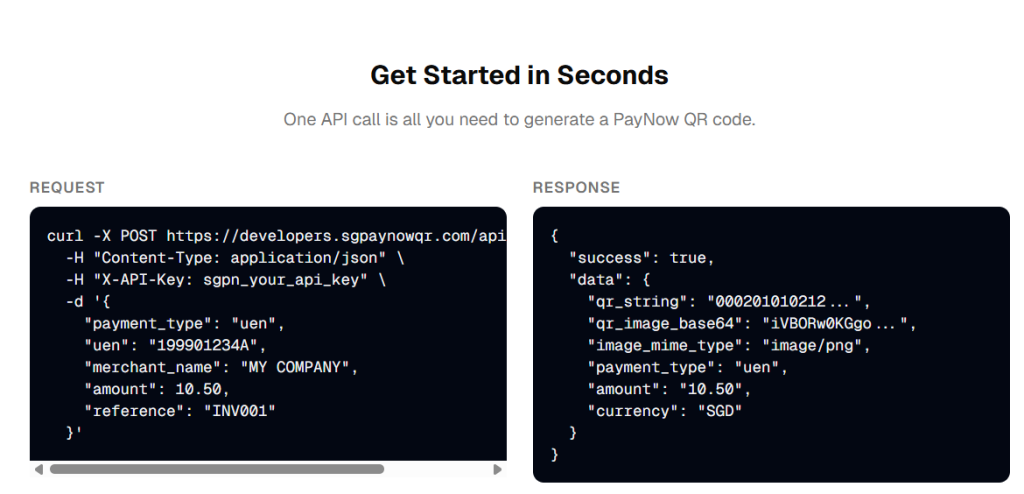
The API lets you generate EMVCo-compliant PayNow QR codes with a single POST request. You send it the payment details (who gets the money, how much, and an optional reference), and it sends back both the raw QR string and a ready-to-use PNG image.
The QR codes follow the SGQR standard, which means they work with every major banking app in Singapore: DBS, OCBC, UOB, and the rest.
It supports all three PayNow recipient types:
- UEN — for registered businesses
- Mobile number — for individuals and freelancers
- VPA/Wallet — for e-wallets like GrabPay, Wise, and Aspire (learn more about PayNow recipient formats)
Who Is This For?
If you’re a seller or small business owner who already uses our WooCommerce plugin or online generator, you probably don’t need the API. Those tools already handle your PayNow QR needs without writing any code.
The API is built for developers and technical teams who are building their own systems. For example:
Custom invoicing or billing tools. If you’re building invoicing software for Singapore businesses, you can embed a PayNow QR code directly on each invoice with the exact amount and invoice number pre-filled. No more asking customers to manually type in your UEN and the right amount. We’ve seen how much friction that causes; it’s one of the most common PayNow mistakes that cost businesses money.
POS and retail systems. Building a point-of-sale app for hawker stalls, retail shops, or F&B outlets? The API lets you generate a fresh, dynamic QR code for every transaction, with amount and reference already baked in. The customer scans, confirms, done.
Booking and appointment platforms. Tuition centres, clinics, fitness studios, co-working spaces; any platform that takes bookings can include a PayNow QR on the confirmation page or reminder email. The payment is tied to that specific booking, which makes reconciliation much cleaner.
E-commerce platforms beyond WooCommerce. If you’re running on Magento, Laravel, a custom-built store, or even a headless commerce setup, the API gives you a straightforward way to offer PayNow at checkout. Our WooCommerce plugin already does this for WordPress stores, but not everyone uses WordPress.
Internal tools and automation. Accounts teams that need to generate payment QR codes in bulk from within their software, or workflows that create and send payment requests automatically; the API slots right in.
Getting Started
- Create a free account at developers.sgpaynowqr.com/register
- Generate an API key from the dashboard
- Make your first API call using the key in the
X-API-Keyheader - Integrate with your existing systems or workflows to generate PayNow QR codes when needed
Full documentation is available at developers.sgpaynowqr.com/docs.
If you’re already using the SGPayNowQR WooCommerce plugin, the API and the plugin are separate products. The plugin is still the easiest way to accept PayNow on WooCommerce and does not require the API. The API is for when you need to generate QR codes programmatically in other contexts.
A Quick Note on Security
The API generates QR codes containing payment routing information (your UEN or mobile number, the amount, and a reference). It does not process, hold, or touch any actual funds. The payment happens entirely within the customer’s banking app, between their bank and yours. No sensitive financial data passes through our servers.
This is the same model used by our other tools, and it’s one of the reasons PayNow is safer from certain types of scams compared to credit card payments. There are no card numbers to steal and no chargebacks to worry about.
Try It Out
If you’re a developer building something for Singapore businesses, give the API a spin. The free tier is there for exactly this: try it, break it, see if it works for your use case. No credit card, no commitment.
And if you’re a seller or business owner reading this and thinking “I’m not a developer, but I wish my invoicing tool / booking system / custom app had PayNow built in” then share this with whoever builds your tech.