If you sell on Lazada Singapore (or thinking about it), you need to know what it actually costs.
Lazada doesn’t charge monthly subscriptions or listing fees, which is nice. But just like Shopee, they take a slice of every sale through commissions, payment processing fees, and optional service fees. And those slices have gotten bigger over the past two years.
In this guide, we’ll walk through the fee types, show you worked examples with real numbers, and help you figure out what you actually keep after Lazada takes its cut.
How Lazada’s Fees Have Changed
Lazada’s fee structure has shifted meaningfully in a short span. Here are the changes we can trace through official Seller Centre announcements:
May 2024: Lazada adjusted its commission structure for both Marketplace and LazMall sellers. Marketplace rates went up from 2% to 4%, and LazMall jumped from 3% to 7% (for electronics).
August 2025: Commission rates jumped again. Marketplace sellers saw rates rise to a tiered system: 5% for electronics, 5% for groceries, and 6.5% for all other categories.
February 2026: Another 3% increase across the board for both Marketplace and LazMall sellers, unless you join Lazada’s SPA programme (more on that below). This is where we are at now.
That means a Marketplace seller in a general category went from 4% to 6.5% to 10% (before GST) in under two years. The trend mirrors what we’ve seen from Shopee’s escalating fees — platforms that once competed on low costs are now recouping their investments by charging sellers more.
The Three Types of Lazada Seller Fees
1. Commission Fee
This is the main fee. Lazada charges a percentage of the item price (after seller-funded discounts like vouchers and Flexi Combo) on every completed order.
The rate depends on your product category and whether you’re a Marketplace seller or LazMall seller.
Marketplace seller commission rates (Non-SPA, from 9 February 2026):
| Category | Rate (before GST) | Rate (incl. 9% GST) | Cap |
|---|---|---|---|
| Core electronics (mobiles, tablets, desktop computers, laptops, printers, software) | 8.5% | 9.27% | $30 |
| Other electronics (camera & drones, gaming, others) | 10.0% | 10.90% | $30 |
| Baby & pet (diapering, milk formula, pet supplies) | 8.5% | 9.27% | $60 |
| Groceries & all other categories | 10.0% | 10.90% | $60 |
If you join the SPA programme, rates stay at the older, lower levels (5.0–6.5% before GST) plus a 4% SPA service fee.
LazMall seller commission rates (Non-SPA, from 9 February 2026):
| Category | Rate (before GST) | Rate (incl. 9% GST) | Cap |
|---|---|---|---|
| Mobiles, tablets, desktop computers, laptops | 9.0% | 9.81% | $75 |
| Large home appliances, computer components, printers, software | 11.0% | 11.99% | $75 |
| Camera & drones | 10.0% | 10.90% | $75 |
| Gaming devices, other electronics | 13.0% | 14.17% | $75 |
| Baby & pet (diapering, milk formula, pet supplies) | 11.0% | 11.99% | $150 |
| Alcoholic beverages & all other categories | 13.0% | 14.17% | $150 |
The full category-by-category breakdown tables (matching what you see in Lazada Seller Centre) are included further down this post.
Note: Lazada publishes commission rates before GST, with 9% GST added on top. The “incl. GST” column above is the effective rate you actually pay. Always check your Lazada Seller Centre dashboard for your exact category rate.
Important notes:
- New sellers get a 90-day grace period with no commission fees. Your commission kicks in from day 91 after your first product listing.
- Commission is calculated on the item price minus seller-funded promotions (like your own vouchers or Flexi Combo discounts). Platform-funded discounts are not deducted.
- You won’t be charged commission on failed deliveries or returned orders. For partial returns, the commission is reversed based on the refunded amount.
The formula is:
Commission Fee = Commission Rate × (Item Price – Seller Promotions) + 9% GST
2. Payment Fee
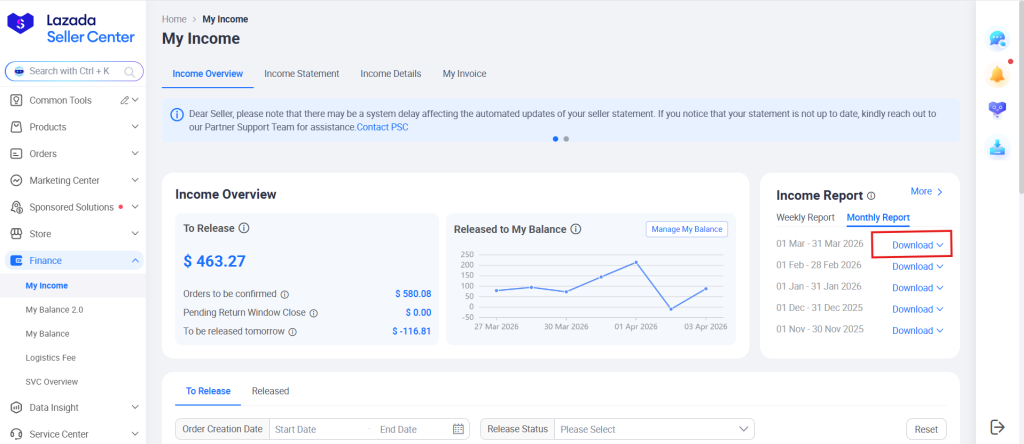
On top of commissions, Lazada charges a payment processing fee of 3.0% before GST (3.27% inclusive of GST) on every transaction. This covers credit card processing, Lazada Wallet, and other payment methods.
This fee is calculated on the item price plus any shipping fees paid by the buyer, and is deducted automatically from your payout. We verified this against actual Lazada transaction reports — the 3.27% rate is consistent across all orders.
3. Service Fee (SPA Programme)
This is optional. Lazada’s Seller Promo+ Advantage (SPA) programme charges a 4% service fee per item (capped at $60) in exchange for benefits like:
- Keeping the old, lower commission rates (the Feb 2026 increase doesn’t apply to SPA sellers)
- Waived event registration fees
- Platform-funded voucher support
- SPA-exclusive product badges for extra exposure
Joining SPA is voluntary, but Lazada is clearly pushing sellers towards it. If you regularly participate in mega sales events (11.11, 12.12), the trade-off may be worthwhile since you’d avoid the 3% commission hike while gaining promotional benefits.
However, for a new or small seller who doesn’t participate in platform campaigns, paying an extra 4% service fee may not make sense.
Worked Examples
Let’s run the numbers so you can see exactly what you’d keep from a sale. All fee rates below include 9% GST, since that’s what actually gets deducted from your payout.
Example 1: Skincare product at $50 (Marketplace seller, non-SPA)
| Line Item | Amount |
|---|---|
| Listing price | $50.00 |
| Seller voucher | -$5.00 |
| Purchase value (what buyer pays) | $45.00 |
| Commission (10.9% incl. GST, “Other Categories”) | -$4.91 |
| Payment fee (3.27% incl. GST) | -$1.47 |
| Total fees | -$6.38 |
| Your payout | $38.62 |
On a $50 listing with a $5 discount, you keep $38.62. Lazada takes $6.38 — about 14.2% of the purchase value.
Example 2: Wireless earbuds at $120 (Marketplace seller, non-SPA)
| Line Item | Amount |
|---|---|
| Listing price | $120.00 |
| Seller voucher | -$10.00 |
| Flexi Combo discount | -$5.00 |
| Purchase value | $105.00 |
| Commission (10.9% incl. GST, “Others Electronics”) | -$11.45 |
| Payment fee (3.27% incl. GST) | -$3.43 |
| Total fees | -$14.88 |
| Your payout | $90.12 |
That’s 14.2% of the purchase value going to fees. The commission cap of $30 doesn’t kick in here since $11.45 is below it. For electronics items where the commission calculation exceeds $30, the cap limits your commission to $30 + GST = $32.70.
Example 3: Women’s handbag at $85 (LazMall seller, non-SPA)
| Line Item | Amount |
|---|---|
| Listing price | $85.00 |
| Seller voucher | -$10.00 |
| Purchase value | $75.00 |
| Commission (14.17% incl. GST, LazMall “Other Categories”) | -$10.63 |
| Payment fee (3.27% incl. GST) | -$2.45 |
| Total fees | -$13.08 |
| Your payout | $61.92 |
That’s 17.4% of the purchase value going to Lazada. For a LazMall seller, the trust badge and campaign access may justify the premium. But for smaller sellers, these rates can squeeze margins hard.
How Lazada Compares to Shopee
If you’re already selling on Shopee (or considering both), it helps to see the fees side by side.
| Fee Type | Lazada (Marketplace, non-SPA) | Shopee (Non-Mall) |
|---|---|---|
| Commission | 9.27–10.9% (incl. GST) | 7.63% (up to 11.99% for some categories) |
| Payment/Transaction fee | 3.27% (incl. GST) | 3.27% |
| Service fee (optional) | 4% (SPA programme) | 3.27–5.45% (Coins Cashback programme) |
| Commission cap | $30 (electronics) / $60 (non-electronics) | $30 (some electronics only) |
| New seller grace period | 90 days, 0% commission | 90 days, 0% commission |
| Total without optional programme | ~12.5–14.2% | ~10.9% |
| Total with optional programme | Varies (SPA keeps old rates + 4% service fee) | ~14.2–16.4% (with Coins Cashback) |
Sources: Lazada Payment Fee, Shopee Seller Education Hub, SGPayNowQR Shopee Fees Calculator post
Interestingly, both platforms now charge an identical 3.27% payment/transaction fee. The difference is entirely in commission rates and optional programme costs. Without Coins Cashback, Shopee’s base fees (commission + transaction) sit around 10.9%, which is lower than Lazada’s ~12.5–14.2%. But most Shopee sellers join Coins Cashback for the visibility boost, which pushes their total to 14.2–16.4% depending on category.
Bottom line: Lazada’s base fees (without optional programmes) are now higher than Shopee’s base fees. But once you factor in Shopee’s Coins Cashback programme, the two platforms end up in a similar range — with Shopee slightly more expensive at the top end.
Both platforms are trending the same direction: higher fees, year after year. If you’re selling on either, it’s worth doing the maths regularly to make sure your margins still work.
For a deeper breakdown of Shopee’s fees, check our Shopee Fees Calculator and the companion post: Shopee Fees Calculator: How Much Do You Actually Keep Per Sale?
How to Reduce Your Lazada Fees
You can’t eliminate fees entirely, but there are ways to manage them.
Take advantage of the 90-day grace period. If you’re just starting out, you have three months of zero commission. Use that window to test products, build reviews, and establish your store without fees eating into your margin.
Evaluate the SPA programme carefully. If you regularly run promotions and join mega campaigns, SPA’s 4% service fee may save you money compared to the 3% commission increase. Run the numbers for your specific product mix before opting in.
Watch your category classification. Commission rates vary by category. Make sure your products are listed in the correct category — being miscategorised into a higher-fee bracket is an easy (and unnecessary) cost leak.
Factor all fees into your pricing. This sounds obvious, but many sellers set prices without accounting for commissions, payment fees, and GST. Use this formula as a starting point:
Minimum Selling Price = (Product Cost + Desired Profit) ÷ (1 – Total Fee %)
For example, if your product costs $30 and you want $15 profit, with total fees of 14.2% (general category):
($30 + $15) ÷ (1 – 0.142) = $52.45
So you’d need to price at least $53 to maintain your target margin.
The Bigger Question: How Much of This Do You Actually Need to Pay?
Marketplace fees are the cost of access to a ready-made audience. Lazada brings millions of shoppers to your listing, handles payment processing, and provides logistics infrastructure. That has genuine value.
But there’s another way to sell to Singapore customers — one where you keep more of what you earn.
If you run your own e-commerce store using a platform like WooCommerce, there are no commission fees, no platform service fees, and no payment processing charges if you accept PayNow. A customer pays you directly, the money goes straight to your bank, and you keep 100% of the transaction.
Of course, you’d need to drive your own traffic. But many sellers find that building a direct channel alongside their marketplace presence gives them the best of both worlds: Lazada and Shopee for discovery and volume, and their own website for repeat customers and better margins.
Here’s a quick comparison of what you’d keep on a $50 product (general category like fashion or skincare, no discounts):
| Channel | Fees | You Keep |
|---|---|---|
| Lazada (Marketplace, non-SPA) | ~$7.09 (14.2%) | $42.91 |
| Shopee (Non-Mall, without Coins Cashback) | ~$5.45 (10.9%) | $44.55 |
| Shopee (Non-Mall, with Coins Cashback) | ~$8.18 (16.4%) | $41.83 |
| Own WooCommerce store (PayNow via SGPayNowQR) | $0 | $50.00 |
| Own WooCommerce store (credit card via Stripe) | ~$2.20 (3.4% + $0.50) | $47.80 |
Lazada’s $7.09 sits between Shopee’s two scenarios. But with your own store and PayNow, you keep everything.
For a full comparison of payment processing costs, check our guide: How to sell online in Singapore with zero payment fees.
The Smart Approach: Use Both
You don’t have to pick one or the other.
Use Lazada for what it does well — exposure, new customer acquisition, and volume. It’s still one of Singapore’s top marketplaces, and the 90-day commission-free period makes it low-risk to test.
At the same time, start building your own WooCommerce store. Accept PayNow as your primary payment method to eliminate transaction fees, and gradually shift your most loyal customers to buy direct.
That way, when Lazada raises fees again (and if history is any indicator, they will), it’s a minor annoyance rather than a business crisis.
Want to start accepting PayNow on your own store with zero commissions? Get the SGPayNowQR WooCommerce plugin and keep 100% of every PayNow transaction.